In one of my recent posts, I was grumbling about not having funds for Camtasia. I had gotten a chance to play with it at a conference I went to this summer, but was disappointed when I found out my district didn't have the software. Well...apparently the spectacular people at TechSmith read my blog & took pity on me. They gave me a copy of Camtasia to try out this year...so a hearty thank-you goes out to TechSmith, you all are amazing!
Since then, I also got a partner in crime who wants to try this whole flipped/mastery thing out with me...so yeah for me! She recently came over & we were able to get our entire first unit filmed. The week that followed allowed me some time to toy around with Camtasia & I am loving it so far :) I'm still trying to figure out all the in's & out's of the program, but I can record, zoom, highlight & put in notes, which are the most essential pieces to enhancing the videos (in my humble opinion).
I also recently got my youtube channel up & running. This is where I plan to store all of our flipped classroom videos. If you're interested in checking out the videos that Jodi & I made, you can access my my channel here. I've heard there is a way to require the students to answer a question during your video to allow them to move on...if anyone knows how to do that, I'd appreciate the info!
If you watch the videos we've made so far, you'll notice I've had to do a lot of work making the transitions in the slideshow come in at the right time. I don't have a tablet to write on, which I think would make the process even easier for us & for the kids. I think there is something to be said for students watching how I actually solve problems by hand. I asked our tech department if they happened to have a tablet laying around (a girl can dream, right?) & they actually do have one that I can use!
On a less positive note, I found out recently that I do not get my i-pad back next year...they had to give it to a different teacher to be used for a different purpose...It's all tied to the funding that was used to purchase the i-pad. I understand the why, but it still stinks. I was hoping to get the students more involved in the video making process this year, and that was going to rely heavily on using the i-pad. Being the optimistic person that I am, I won't let that stop me. I'll write a grant for an i-pad...unless anyone has one of those laying around too ;)
Monday, August 13, 2012

Wednesday, August 8, 2012
Making videos as a team...my first experience
If you remember from some of my past ramblings, I've been trying to figure out a way to get another teacher to flip with me this year. I am excited to announce that one of the other 5th grade teachers in the district (different building) is also interested. We got together earlier this week & filmed the entire first unit of videos. I still have to edit & post them on youtube, but they are recorded, which is a start. I have one edited & posted, which I've embedded here :) Keep in mind, I am a rookie at Camtasia, I'm sure there is more I can edit, but I don't totally know how to do it yet...baby steps :)
After several discussions, this is how we see our day/year starting out.
We'll begin with a video on how to watch a video. We'll be utilizing a modified WSQ that I learned about from Crystal Kirch. Then we'll continue into Unit 1. We plan on watching & completing the WSQ in class for the first unit. Heavy guiding at first, in hopes of them doing it right the rest of the year. Mastery will not start in unit one...
Unit 2 we'll start weaning the kids off of us watching the videos in class & them watching at home. I'm not sure that mastery will start in unit two either...we'll see how things play out. When I think of mastery teaching in my class, the kids are going to be taking quizzes on each of the learning goals (our "I can" statements). They must pass the quizzes to move on. This will allow (to some extent) the ability for the students to pace themselves.
Hopefully, by the time we get to Unit 3, we'll have all the quizzes set up & ready to go :) That being said, I'm realizing exactly how much we have to do for each unit. On our to do list:
A few things to note (and some concerns too):
After several discussions, this is how we see our day/year starting out.
We'll begin with a video on how to watch a video. We'll be utilizing a modified WSQ that I learned about from Crystal Kirch. Then we'll continue into Unit 1. We plan on watching & completing the WSQ in class for the first unit. Heavy guiding at first, in hopes of them doing it right the rest of the year. Mastery will not start in unit one...
Unit 2 we'll start weaning the kids off of us watching the videos in class & them watching at home. I'm not sure that mastery will start in unit two either...we'll see how things play out. When I think of mastery teaching in my class, the kids are going to be taking quizzes on each of the learning goals (our "I can" statements). They must pass the quizzes to move on. This will allow (to some extent) the ability for the students to pace themselves.
Hopefully, by the time we get to Unit 3, we'll have all the quizzes set up & ready to go :) That being said, I'm realizing exactly how much we have to do for each unit. On our to do list:
- Make slideshow for each learning goal.
- Make video for each learning goal.
- Edit video for each learning goal.
- Write multiple questions for each learning goal that will be input into Moodle.
- Repeat for next unit!
A few things to note (and some concerns too):
- Positive: I really like us recording the videos together (it's way more fun)!
- Concern: How in the world are we going to make this work during the school year when we aren't in the same building.
- Positive: I particularly like that one of us can ask the questions we know the student will ask, and the other can answer.
- Concern: How in the world are we going to make this work during the school year when we aren't in the same building.
- Positive: Mastery - I'm very excited by the whole concept, it's exciting where this can take the kids.
- Concern: How in the world are we going to make this work during the school year when we aren't in the same building.
We are hoping that our principals will give us some time throughout the year to work on this long list of items...keep your fingers crossed!
Saturday, July 28, 2012
Top 25 Teacher Moms
My blog was nominated for the "Top 25 Teacher Moms" through Circle of Moms. The qualifications are as follows:
- Mom
- Teacher
- Blogger of creative ideas, creative lessons & classroom resources
Being a mom and being a teacher are both incredibly important to me, which makes this category a perfect fit. If you read my blog, and have found it helpful in your classroom, I'd appreciate you voting for me :) You can vote once a day until August 9th. To vote, click on the badge in the right corner of my blog. Or click here.
Thanks everyone! Much love!
Wednesday, July 25, 2012
My Vision of Mastery
At the Flipped Class Training I attended recently, I was forced to sit down, and think about what my class is really going to look like in the fall. I've had all these ideas bouncing around in my head & I haven't gotten a very concrete plan in place. I've been watching, researching & listening to podcasts on the Flipped Classroom, and there seems to be a variety of opinions of how a class might run. The three main people I've been listening to are: Ramsey Musallam, Brian Bennett & Jon Bergmann. I'll attempt to break down their beliefs (and if I got them wrong...sorry Ramsey, Brian & Jon), but you would probably have better luck checking out their blogs. All of these Flip Class pioneers believe that we need to evaluate what we do when are kids are with us. The guiding question of a flipped classroom is: What is the best use of my face-to-face time with the kids? Do we want them to do the lower level thinking, or higher? Everyone who is using the flipped class method feel that the higher order thinking should be done in the classroom, when the teacher is there to guide & assist. There are some other minor differences in how the three gentlemen I mentioned above run their classroom.
Ramsey has the belief that you should have an inquiry that gets the kids interested, but slightly confused, then they watch the videos as needed to help them through the inquiry. He's not a strong supporter of the mastery concept.
Brian believes in using videos for concepts that you have to repeat over & over again. He tends to front load his videos (showing them first), then lets the kids work through higher order activities in class. Brian allows his students to watch the videos & do the work at a time that suits them. He even goes so far as to let the kids work on other subjects during his class time (assuming they've completed the required coursework for him & have mastered the concept).
Jon definitely believes in the mastery concept. He sets limits for his students in regards to how many videos they need to finish by a certain time. His kids go at their own pace...to a certain extent.
Luckily, I had the time to sit down & think things through (with the guidance of flipclass pro Jon Bergmann). What I've come up with seems (to me) to be a mash-up of Ramsey, Jon & Brian's classrooms.
I intend for my students to work at their own pace (similar to Jon), but within parameters. For example, they may need to have 2-3 objectives mastered by the end of the week. When and where they watch the videos is going to be up to them, but I will expect that they have their designated work done by the designated time (similar to Brian). The beginning of each unit will have some sort of an inquiry project that will hopefully be too hard for them to solve then, but will be totally solvable by the end of the unit. My hope is that they will get interested in the beginning, want to see the videos to help them answer the problem, then solve the inquiry as the unit progresses (similar to Ramsey).
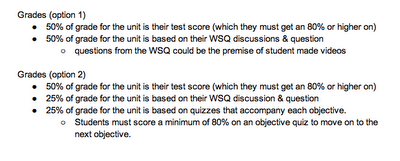
Other changes in my class revolve around expectations while watching the video, and grading. While watching the video the students will complete a WSQ...if you're not sure how that will look in my class, click here. In regards to assessment, I'm not 100% sure how I'm going to grade right now because I don't know if I'll have the flexibility to grade the way I want. My district works hard to get every kid the same experience, which means we have common assessments. But here are the plans I'm thinking of in regards to grading.
Ramsey has the belief that you should have an inquiry that gets the kids interested, but slightly confused, then they watch the videos as needed to help them through the inquiry. He's not a strong supporter of the mastery concept.
Brian believes in using videos for concepts that you have to repeat over & over again. He tends to front load his videos (showing them first), then lets the kids work through higher order activities in class. Brian allows his students to watch the videos & do the work at a time that suits them. He even goes so far as to let the kids work on other subjects during his class time (assuming they've completed the required coursework for him & have mastered the concept).
Jon definitely believes in the mastery concept. He sets limits for his students in regards to how many videos they need to finish by a certain time. His kids go at their own pace...to a certain extent.
Luckily, I had the time to sit down & think things through (with the guidance of flipclass pro Jon Bergmann). What I've come up with seems (to me) to be a mash-up of Ramsey, Jon & Brian's classrooms.
I intend for my students to work at their own pace (similar to Jon), but within parameters. For example, they may need to have 2-3 objectives mastered by the end of the week. When and where they watch the videos is going to be up to them, but I will expect that they have their designated work done by the designated time (similar to Brian). The beginning of each unit will have some sort of an inquiry project that will hopefully be too hard for them to solve then, but will be totally solvable by the end of the unit. My hope is that they will get interested in the beginning, want to see the videos to help them answer the problem, then solve the inquiry as the unit progresses (similar to Ramsey).
Other changes in my class revolve around expectations while watching the video, and grading. While watching the video the students will complete a WSQ...if you're not sure how that will look in my class, click here. In regards to assessment, I'm not 100% sure how I'm going to grade right now because I don't know if I'll have the flexibility to grade the way I want. My district works hard to get every kid the same experience, which means we have common assessments. But here are the plans I'm thinking of in regards to grading.

So what will my typical day look like? Here's what I'm thinking (I have my students for about 50 minutes a day):
Kids come in & we meet for a couple minutes, just to touch base, then it's off to work! Kids will be doing one of the following:
- Watching a video
- Having a group WSQ discussion (with me present to help give them a grade)
- Working on practice problems (together or independently)
- Taking a quiz or test on the computer (using Moodle)
- Working on another subject...if they are caught up
- Completing a math lab (that's what I'm going to call my real world application problems)
- Making videos of their own that center around the assigned topic
So as you can see, it is going to be slightly chaotic...but I'm thinking this kind of chaos is going to be awesome!
If anyone reading this has some ideas that might make this run smoothly, I'd love the feedback.
Tuesday, July 24, 2012
Learning is so invigorating!
This summer I was completely bummed out because I couldn't attend FlipCon 2012 in Chicago. I did attend virtually, but it's just not the same. So you can imagine my delight when I found out that Jon Bergmann was going to be giving a 2 day flipped class P.D. in Muskegon (about 45 minutes from my house). As if that's not awesome enough, it was only $60 AND I get a copy of Jon & Aaron's new book AND I got lunch both days (it's the small things, right?).
So now I am charged with thinking through everything I'm learning. So here we go!
Day 1
Day one was basically an intro to the different methods of flipping. It also introduced us to some different software that can be used to create videos. Some software I got to play with was: Snag-it, Camtasia and Screencastomatic.com. I've used Screencast-o-matic to make my videos this year, so I was familiar with it. I did find out-that you can add picture in picture on Screencast-o-matic (which I did not know before). We also got to take a look at several different apps that can be used to make recordings.
I would love to get Camtasia for Mac, but alas, neither my district or I can dish out the cash right now. I plan on attending EdCampGR next month, so maybe I'll luck out & score a free copy there. Or maybe the people at Techsmith will take pity on me & just send me one (hint, hint).
Day one didn't leave me too overloaded, as a lot of the information wasn't new to me. However, I caught Jon on the way out & asked if we could eat together the next day because I needed some guidance on how to get me head around the whole "mastery teaching" thing.
Day 2
We started day 2 watching some sample videos that showed me just how boring mine have been. They're not terrible, but I know I can do better. Here are some of the changes I'd like to make to my videos next year:
So now I am charged with thinking through everything I'm learning. So here we go!
Day 1
Day one was basically an intro to the different methods of flipping. It also introduced us to some different software that can be used to create videos. Some software I got to play with was: Snag-it, Camtasia and Screencastomatic.com. I've used Screencast-o-matic to make my videos this year, so I was familiar with it. I did find out-that you can add picture in picture on Screencast-o-matic (which I did not know before). We also got to take a look at several different apps that can be used to make recordings.
I would love to get Camtasia for Mac, but alas, neither my district or I can dish out the cash right now. I plan on attending EdCampGR next month, so maybe I'll luck out & score a free copy there. Or maybe the people at Techsmith will take pity on me & just send me one (hint, hint).
Day one didn't leave me too overloaded, as a lot of the information wasn't new to me. However, I caught Jon on the way out & asked if we could eat together the next day because I needed some guidance on how to get me head around the whole "mastery teaching" thing.
Day 2
We started day 2 watching some sample videos that showed me just how boring mine have been. They're not terrible, but I know I can do better. Here are some of the changes I'd like to make to my videos next year:
- I'd like a partner to shoot videos with. In the examples I saw, the most interesting style was the conversational style. Basically there were two teachers having a conversation about the topic.
- So here's the problem with that...I'm the only 5th grade math teacher in my building, so what now? I figure I have a couple of options:
- Try to buddy up with a 5th grade teacher from another building. This is a possibility, as one of the other 5th grade teachers is interested. I'm hoping that I can talk her into it...come on Jodi, you know you want to :)
- Try to buddy up with a 5th grade teacher from another school/state (this is actually possible: @guster4lovers & @thomasson_engl are creating collaborative videos cross country...it's crazy!)
- Try to buddy up with a 4th grade teacher...many of our standards are very similar.
- Rather than making videos of every lesson in my math book, I started to find the most essential information. I turned them into "I can" statements, now I want to make videos of those. This should equal less video watching time, and more time to apply the knowledge.
We then progressed to talking about moodle. I have used moodle before, but only to post links, newsletters, etc. I was introduced to using moodle questions & quizzes...I am going to have a whole post on moodle later, but I'm really excited about what it has to offer.
After moodle, we had lunch. I had the privelege of eating with Jon, and picking his brain the whole time. The majority of what we talked about was how to make mastery teaching work in an elementary school. I'll have another post about that shortly, because I have a lot of ideas running around in my head.
We basically had the rest of the day to spend working on something...anything, really, it just had to be applicable to our training. Since I have experience making videos, I chose not to do that. Instead I decided to map out what a unit might look like in mastery teaching. Below I've embedded a Googledoc that is a rough start to my unit plan. Please bare in mind it is in rough form, and will be tweaked.


Tuesday, July 17, 2012
FlipCon Session "Managing the Flipped Classroom Using Google Apps"
I recently watched another session from FlipCon 12. The presenter for this presentation was Andy Schwen (@mrschwen), a teacher from Minnesota. He's known as the master of google forms (okay, I don't know if that's true, but he should be). He uses Google forms to create assessments. While the assessment creation is pretty sweet, that isn't what was so spectacular about what he did. He created another form that automatically analyzes your student's quizzes. I'm not talking just grading them - this form gives you a breakdown by question, by student, by class...and probably a bunch of other things I don't even realize yet!
Below is the video he shows of everything you can do with the Google Form he set up...prepare yourself, it is crazy!
I didn't want to blog about something I hadn't tried, so I decided to follow his step by step instructions. I did everything he listed, but my class list was not showing up on my "assessment form"...frustration ensued, but I read further & he recommended checking out Audrey McLaren's set of directions, she had a more narrative form, so I trudged on & visited her site to try again.
I deleted everything I had done so far, and started from scratch, and yet again my class list did not show up on my assessment form. Thank the lord for twitter & awesome people on twitter because I messaged Andy Schwen directly & he replied within 5 minutes. I am constantly amazed at what an amazing tool twitter is, & it frustrates me more & more that teachers aren't utilizing it! However, I've veered off topic...as it turns out I was following both sets of directions correctly, but I was inputting one small thing wrong. This will make no sense to any of you at all (unless you've had the same problem as me), but my issue arose when I cut & pasted my class list url & put it into my assessment form. The original directions said to cut everything in the url from after the work "key="...however I had to copy everything between the "key=" and the "#" at the end of the url...How in the world Andy knew this I have no idea, but he did & I am grateful because now I have a super sweet assessment tool.
The tutorial on how to create the Google forms he uses are on his website: mrschwen.blogspot.com.
So how am I going to use this? I've been thinking a lot about assessments lately, and truth be told, I don't like them much (I'm talking pencil/paper assessments - not authentic assessments). I think they have their place, but I would much rather know that students can apply what they've learned. I would love to go to more to project based learning (including assessments). As I said, I think assessments have their place, but I think they need to be used the right way (in case you're not sure the right way - they're supposed to be used to GUIDE instruction). So here is my thought:
I've been toying with the idea of mastery teaching for the past several months, and I know it's something I want to do, but I haven't figured out how to organize it all. One thought I've been considering is coming up with some quick quizzes for my students to take after they think they have mastered a content expectation, in order for them to move on. The thought of creating, then grading, then analyzing all that data is a touch overwhelming. This is where these google forms come into play. If I can get the quizzes created, then all my students have to do is take them, then google analyzes everything for me...yippi! Creating all those quizzes sounds like a very daunting task, especially since I want to have more than one for each standard. But like everything else I've been doing in the flipped class, it's going to be a lot of work at first...but the payoff in the end will be awesome!
Below is the video he shows of everything you can do with the Google Form he set up...prepare yourself, it is crazy!
I didn't want to blog about something I hadn't tried, so I decided to follow his step by step instructions. I did everything he listed, but my class list was not showing up on my "assessment form"...frustration ensued, but I read further & he recommended checking out Audrey McLaren's set of directions, she had a more narrative form, so I trudged on & visited her site to try again.
I deleted everything I had done so far, and started from scratch, and yet again my class list did not show up on my assessment form. Thank the lord for twitter & awesome people on twitter because I messaged Andy Schwen directly & he replied within 5 minutes. I am constantly amazed at what an amazing tool twitter is, & it frustrates me more & more that teachers aren't utilizing it! However, I've veered off topic...as it turns out I was following both sets of directions correctly, but I was inputting one small thing wrong. This will make no sense to any of you at all (unless you've had the same problem as me), but my issue arose when I cut & pasted my class list url & put it into my assessment form. The original directions said to cut everything in the url from after the work "key="...however I had to copy everything between the "key=" and the "#" at the end of the url...How in the world Andy knew this I have no idea, but he did & I am grateful because now I have a super sweet assessment tool.
The tutorial on how to create the Google forms he uses are on his website: mrschwen.blogspot.com.
So how am I going to use this? I've been thinking a lot about assessments lately, and truth be told, I don't like them much (I'm talking pencil/paper assessments - not authentic assessments). I think they have their place, but I would much rather know that students can apply what they've learned. I would love to go to more to project based learning (including assessments). As I said, I think assessments have their place, but I think they need to be used the right way (in case you're not sure the right way - they're supposed to be used to GUIDE instruction). So here is my thought:
I've been toying with the idea of mastery teaching for the past several months, and I know it's something I want to do, but I haven't figured out how to organize it all. One thought I've been considering is coming up with some quick quizzes for my students to take after they think they have mastered a content expectation, in order for them to move on. The thought of creating, then grading, then analyzing all that data is a touch overwhelming. This is where these google forms come into play. If I can get the quizzes created, then all my students have to do is take them, then google analyzes everything for me...yippi! Creating all those quizzes sounds like a very daunting task, especially since I want to have more than one for each standard. But like everything else I've been doing in the flipped class, it's going to be a lot of work at first...but the payoff in the end will be awesome!
Monday, July 2, 2012
Lightbulb Moment
This summer I've been doing a lot of thinking about how my flipped class went last year, and where I want it to go in the future. As you know, this past school year was my first year flipping, and at the start I was thrilled with how it was going. The kids were more engaged, and they were out performing last year's class on almost every assessment. That wasn't the best part, though. The best part was that I knew my class. I mean I really knew them. I could tell you at any given time exactly where each student was, what they did well, and what they needed to continue to work on.
As the year progressed I became less and less content with what I was doing. I didn't change anything about how my math class ran, which I think became the problem. I started to see the potential my students had that was being ignored. At that point, it was so late in the year that I didn't have a lot of opportunity to explore other ways to utilize my in class time. Buzz words like mastery learning and project-based learning kept running through my head, but I am the first to admit I have zero training in either. I don't like that feeling of not knowing exactly what I want to do to improve, but knowing I need to make some changes.
So fast-forward to this morning, when I was grocery shopping, and listening to the Flipped Learning Network Podcast (which, by the way, is a wonderful resource for keeping inspired and knowing you're on the right track). I was listening to week 3, where Troy Cockrum interviewed Ramsey Musallam. I hadn't been following Ramsey yet, so I didn't know much about him, but I had heard his name dropped by several people during other PD's I've been involved in. Anyhow, during this particular segment he was talking about how he explains flipped class. He said (I'm paraphrasing here), think of flipped class like flipping Bloom's Taxonomy. Typically students would do lower order thinking skills in class (with the lecture), then turn around & do the higher order thinking skills at home. Flipped class changes that. Now students are doing the higher order thinking skills at school & the lower level at home. I hadn't thought about it like that...at all. But it totally makes sense. I had a moment, like we love to see in our students, where a light bulb went off & I got it. Now I have some direction for where I need to take my students in the fall...and I have Blooms to guide me.
So for helping the light bulb go off in my head, I say thank-you, Ramsey!
As the year progressed I became less and less content with what I was doing. I didn't change anything about how my math class ran, which I think became the problem. I started to see the potential my students had that was being ignored. At that point, it was so late in the year that I didn't have a lot of opportunity to explore other ways to utilize my in class time. Buzz words like mastery learning and project-based learning kept running through my head, but I am the first to admit I have zero training in either. I don't like that feeling of not knowing exactly what I want to do to improve, but knowing I need to make some changes.
So fast-forward to this morning, when I was grocery shopping, and listening to the Flipped Learning Network Podcast (which, by the way, is a wonderful resource for keeping inspired and knowing you're on the right track). I was listening to week 3, where Troy Cockrum interviewed Ramsey Musallam. I hadn't been following Ramsey yet, so I didn't know much about him, but I had heard his name dropped by several people during other PD's I've been involved in. Anyhow, during this particular segment he was talking about how he explains flipped class. He said (I'm paraphrasing here), think of flipped class like flipping Bloom's Taxonomy. Typically students would do lower order thinking skills in class (with the lecture), then turn around & do the higher order thinking skills at home. Flipped class changes that. Now students are doing the higher order thinking skills at school & the lower level at home. I hadn't thought about it like that...at all. But it totally makes sense. I had a moment, like we love to see in our students, where a light bulb went off & I got it. Now I have some direction for where I need to take my students in the fall...and I have Blooms to guide me.
So for helping the light bulb go off in my head, I say thank-you, Ramsey!
Subscribe to:
Posts (Atom)